
Asbestos inspection app
An asbestos inspection app built for the building, not the desk
Field work sets the ceiling on survey quality. If capture is awkward, everything downstream — the report, the results, the inventory — inherits the gaps.
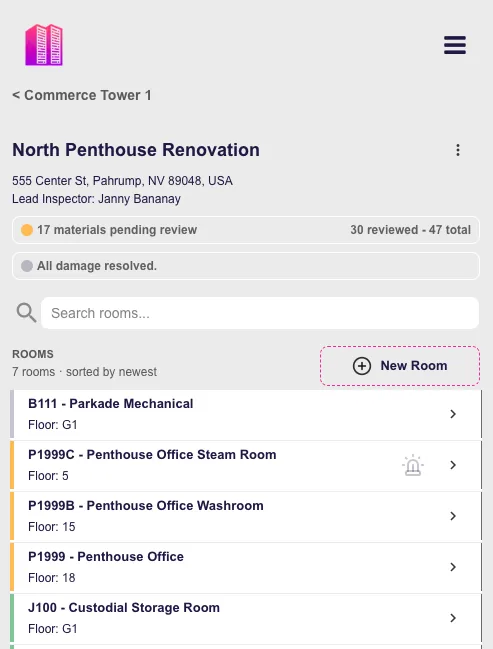
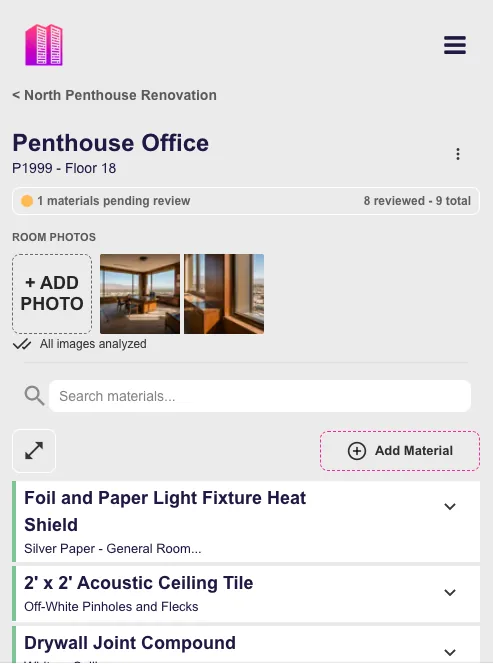
Towerforma's field interface is organized the way a surveyor walks a building: floor by floor, room by room, material by material.
- Room-by-room navigation by floor
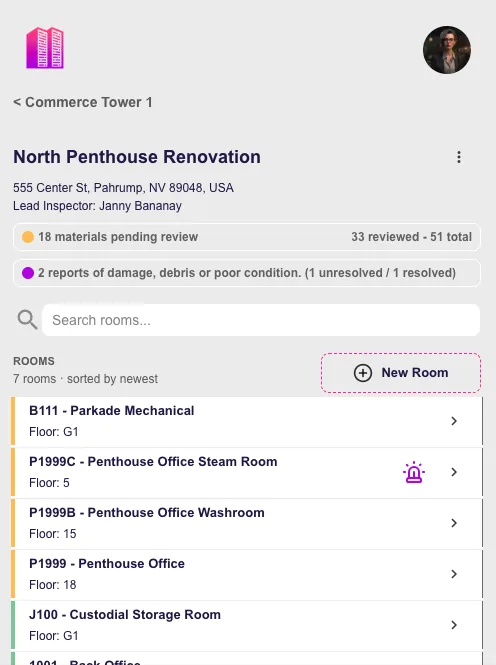
- Photographs attached to rooms and materials
- Reused material descriptions, less retyping
- Multiple surveyors in one building record
Pre-launch · In development with hazardous materials professionals
On site
What actually slows a survey down.
Rarely the assessment itself. Usually the mechanics around it — writing the same description for the eleventh time, remembering which photo belonged to which room, reconciling notes back at the office.
Repetitive entry
The same acoustic ceiling tile appears in thirty rooms and gets described from scratch in each one, with small wording differences that matter later.
Photo reconciliation
Hundreds of images captured in a camera roll, then matched to rooms hours later from memory and timestamps.
Paper to spreadsheet
Field notes transcribed in the evening, which is where transcription errors and omissions enter the record.
Inconsistent between surveyors
Two people surveying the same building describe the same material differently, and nobody notices until report review.
Navigation
Room-by-room, the way you walk the building.
The interface follows the building's structure rather than a form's structure, so your position in the app matches your position in the building.
Floors and rooms in order
Rooms grouped under their floor, so progress through a level is visible at a glance.
Coverage is legible
Rooms you have documented are distinguishable from rooms you have not, which reduces the end-of-day uncertainty about what was missed.
Flags where attention is needed
Rooms that need a condition note or follow-up stay visible instead of living on a separate list.
Add rooms as you find them
Buildings rarely match the drawings. New rooms and areas can be added while you are standing in them.
Capture
Structured capture in the field.
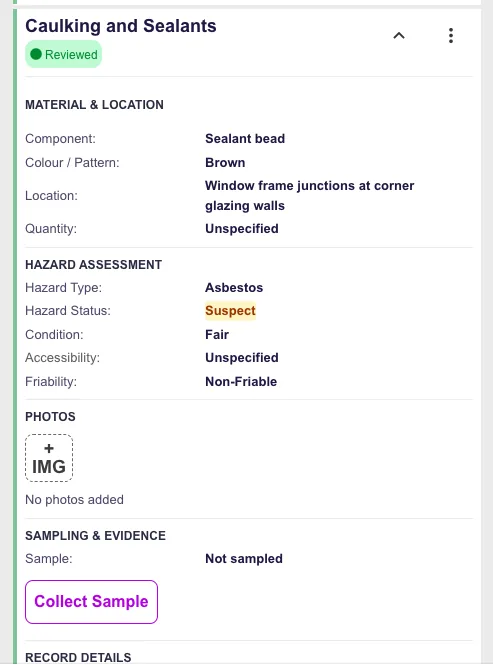
Each material occurrence is recorded as a record with defined fields, in the room where it exists — not as free text to be interpreted later.
Material and description
Chosen from descriptions already used on the project, so wording stays consistent across rooms.
Location within the room
Specific enough that someone else can find the material without you.
Hazard type
Asbestos, lead, PCBs, mercury and other hazardous materials within the project scope.
Assumed or sampled
Recorded explicitly at the point of capture, with sample identifiers where samples were taken.
Condition
Damage, debris and deterioration noted against the occurrence itself.
Photographs
Taken in place and attached to the record, not to a camera roll.
Photo-first flow
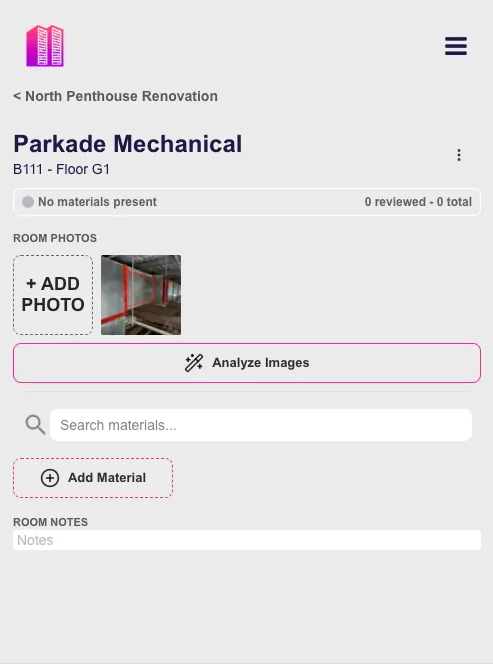
Photograph the room, then confirm the draft.
Photographs already contain much of what gets typed. Towerforma proposes draft material entries from room photographs so the surveyor's time goes to reviewing and correcting rather than transcribing.
- Step 01
Photograph the room
Capture finishes, ceilings, mechanical items and anything that will need to be identified later.
- Step 02
Review proposed entries
Draft material occurrences are suggested from what the photographs show, using the project's existing descriptions.
- Step 03
Correct and confirm
Every draft is the surveyor's to accept, edit or reject. Nothing enters the record without confirmation.
- Step 04
Move to the next room
The confirmed entries are already structured, so no evening transcription session is required.
Drafts are assistance, not assessment. Identification and hazard determination stay with the qualified surveyor.
Teams
Multiple surveyors, one building record.
Large buildings are surveyed by teams. The merge step afterwards is where consistency is usually lost.
Split by floor or area
Surveyors work different parts of the same inspection without duplicating rooms.
Shared descriptions
Everyone draws on the same material descriptions, so the finished survey reads as one document.
No end-of-day merge
Entries land in the building record as they are captured rather than being reconciled from separate files.
Back at the office
Field entries become the report and the inventory.
Because capture was structured, the desk work is review rather than reconstruction.
- Analytical results attach to the sampled occurrence, not to a separate sheet.
- Photographs are already associated with rooms and materials.
- The same records support the report and the ongoing building inventory.
- Later inspections build on the structure instead of starting a new document.
See asbestos survey software for the full survey workflow, or hazmat reporting software for the reporting side.
Questions
Frequently asked
- Does it work on a phone?
- The field interface is designed for a phone held in one hand while the other hand is holding a light, a camera or a sampling tool. Room lists, material entry and photographs are all reachable without a desktop.
- What happens to the photos I take?
- Photographs are attached to the room or the material occurrence they document, so they stay identifiable later instead of becoming a folder of undated images.
- Do I have to type the same material description repeatedly?
- No. Material descriptions and types are reused across rooms, which is what keeps a survey internally consistent and cuts the repetitive part of field entry.
- Can several surveyors work in the same building at once?
- Yes. Multiple surveyors can document different floors or areas of the same inspection, and the entries land in one building record rather than in separate notebooks to be merged later.
- Does the app replace professional judgement?
- No. Identification, assessment and interpretation remain the surveyor's professional work. The app structures capture and reduces retyping; it does not make assessment decisions.
- What about assumed materials?
- Assumed entries are recorded with that status explicit, so they can later be sampled and confirmed without rewriting the record.
Early access
Field capture that survives the walk back to the van.
Towerforma is in pre-launch development with hazardous materials surveyors. Join the early access list for product updates and field testing opportunities.